From Paper Files to Digital Portals: A Short History of Public Forms
Public forms reveal how institutions turn information into decisions. Learn to read their fields, records, and digital changes to see how administration works.
The common mistake with a public form is to treat it as a neutral container: fill in the boxes, submit it, and wait. That overlooks what the form costs a person in time, effort, and sometimes access—and what it gives an institution: a standardized account it can sort, check, and act on. Public forms changed as institutions moved from paper files to digital portals, but their central job remained the same: making people and circumstances legible to administration.
What does a public form actually do?
A form turns a situation into fields that an institution can use. A person might describe a housing problem in ordinary language; an agency may need an address, a category of complaint, a date, and a requested remedy. The form narrows the account into information that can be recorded and routed.
That narrowing is not automatically unfair. Standard fields can make similar requests easier to compare and help staff see whether required information is present. But a field also sets a boundary. If the form offers no suitable category, the person’s situation may be harder to record, even when it is plainly relevant.
Think of a form as a filing cabinet with labeled drawers. The labels help an office put records in order, but they also determine where a record can go. Reading a form closely means noticing both the information it asks for and the choices it makes available.
How did paper forms shape administrative work?
On paper, a form was a physical part of a file. Someone wrote or typed answers, attached supporting documents, and delivered or mailed the packet to an office. Staff could mark a field, add a note, or move the file to another desk. The record traveled at the pace of handling, copying, and storage.
Paper made some things visible: handwriting, attachments, stamps, and marks from processing. It also made records dependent on physical custody. A missing page could be hard to distinguish from a page that had never been submitted. A form could be copied, but copies required work and could drift from the original.
For institutions, standardized paper forms helped turn varied requests into repeatable records. For the public, they provided a fixed route into an office, but that route often assumed access to printing, postage, a nearby counter, or someone able to interpret the instructions. The form’s apparent simplicity could conceal a substantial task.
What changed when forms moved online?
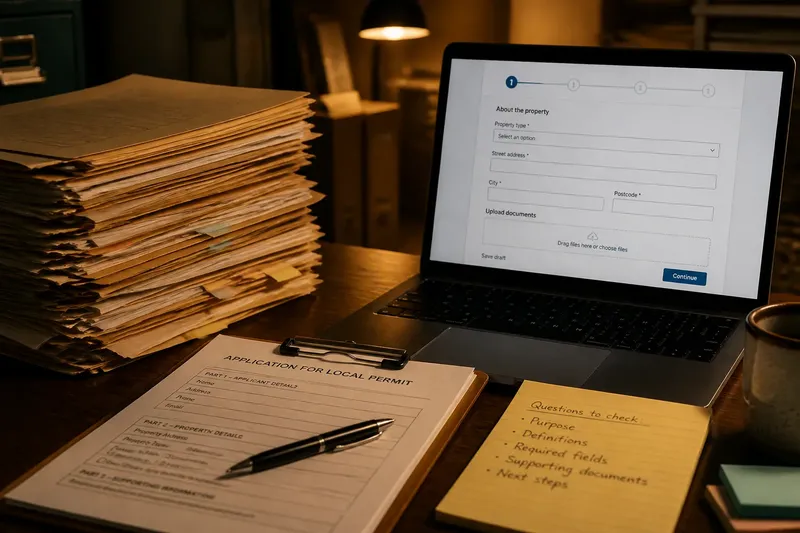
Digital portals changed where a form lives and what can happen while it is being completed. A portal may display questions in sequence, flag an unanswered field, let a person save a draft, or accept uploaded documents. Information can arrive directly in a system rather than being transcribed from paper.
That shift can reduce handling, but it also changes the form’s behavior. A paper page shows many fields at once; a portal may reveal them only after an earlier answer. Some questions may be required by the software even when a person does not have a meaningful answer. A confirmation screen can show that a submission was received, but it does not by itself explain how the institution will assess it.
Digital forms also produce records about the process: the answers, uploaded files, and sometimes the status shown to the user. These features can help people track a request, but only if the portal presents useful information and the office maintains the process behind it. Putting a paper form on a screen is not the same as improving the service.
How can you read a form as a record of institutional choices?
Start with the institution’s stated purpose, then examine how the questions translate that purpose into a record. Notice which details are required, which are optional, and which answers trigger another question. Look for definitions: a term that sounds ordinary may have a specific administrative meaning.
Next, check what the form says about supporting material and what happens after submission. Does it identify the office receiving the information? Does it explain how to correct an error or ask for help? Does it describe the next communication, or merely confirm receipt? These details reveal how much of the process the form makes visible to the person using it.
Pay attention to what is absent, too. A form may leave no room for a circumstance that does not fit its categories. A separate comments box can help, but it may not affect how a request is classified or routed. The useful question is not only “What does this ask?” but also “What will the institution be able to do with the answer?”
Say you are completing an invented application for a local permit and the portal asks for a property type, but the available choices do not fit a mixed-use building. You could review the instructions for a defined category, use the contact route for clarification, and keep a copy of the response. The observable result to look for is whether the office tells you which category to use or how to record the exception—not whether the portal accepts a selection.
Which public-form questions are worth asking?
Why do forms ask for information that seems unrelated?
A field may support identity checks, eligibility review, routing, or later recordkeeping, but the form should make its purpose understandable. If the connection is unclear, look for an explanation on the form or the institution’s service page before supplying extra information.
What should I do if the available answers do not fit?
Check the form’s definitions and instructions, then use its named contact or assistance channel to ask how to record the situation. Avoid choosing an inaccurate option merely to get past a required field; preserve the guidance you receive with your copy of the submission.
Does a digital confirmation mean a request has been approved?
No. A confirmation generally indicates that the system received a submission, not that staff accepted its contents or made a decision. Look for a separate status, decision notice, or explanation of the next administrative stage.
Can I ask for a paper or accessible alternative?
Many institutions provide assistance or another submission route, though the available options differ. Contact the office identified on the form and explain what access or format would let you complete the process.
What should a person check before submitting?
- Purpose: Confirm what service, request, or decision the form concerns.
- Definitions: Read any instructions for terms that determine eligibility or classification.
- Required fields: Identify which answers are mandatory and whether the form explains why.
- Attachments: Check which documents are requested and how the portal or office accepts them.
- Alternative routes: Find the contact method for a question, access need, or answer that does not fit.
- After submission: Note how receipt, status, corrections, and decisions will be communicated.
- Personal copy: Save a copy of the completed form and any confirmation for your records.
For requirements that depend on the form’s instructions, the agency’s rules, or local procedures, follow the relevant source or ask the responsible office. A saved copy is especially useful when a portal offers no clear way to revisit a submission.
What does the history of forms help us see?
Paper and digital forms are not simply old and new versions of the same page. Each format shapes how information is entered, stored, checked, and made visible to the person providing it. Paper often made the file tangible while obscuring its progress; portals can display progress while hiding the system that processes the record.
That is why public forms are worth reading as small pieces of institutional design. Their fields show what an office has decided to count, their instructions show what it expects people to understand, and their submission routes show who can take part without extra help. The history of public forms is, in practical terms, a history of how institutions translate human circumstances into records—and how much of that translation they choose to explain.
When you encounter a public form, treat its fields as clues rather than mere blanks. That habit makes the form’s limits easier to spot and gives you a clearer question to put to the office when the record it asks for does not match the situation you need it to describe.